Air cargo tracking help

Air cargo use a numbering system consisting of 3+8 digits. The tree leading digits indicates which company the shipment belongs to.

This services makes it possible to track air cargo with different airlines from one place. Airline is selected automatically based on the number entered.
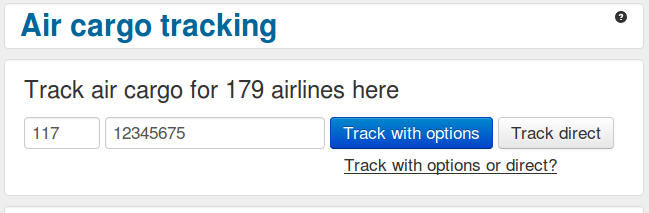
Help_cargo_main_en

  1. Enter number here
  2. Click button "Track with options" to track with the possibility to select a different airline afterwards.
  3. Click button "Track direct" to go directly to the airlines tracking service without options. If the airline is not supported tracking will be executed as "Track with options".
  4. This area contains some usefull air cargo related links.
  5. In this area links to the sites of airlines supported by this service can be found.

Result page

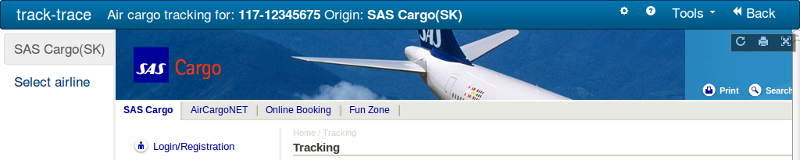
Help_cargo_result_en

  1. The number tracked for.
  2. The company the air cargo belongs to.
  3. Click to return to the air cargo page.
  4. The name of the airline tracked for. Sometimes one will get a message that the unit is with a different airline than the owner when tracking or one may know this for other reasons. One can then get a list here and track for this airline if it is supported. Please note that not all airlines supports tracking of units they don't own, in this case the airline will not show up in this list.
  5. It is possible to override automatic selection of company, and also make some selections for when this should happen.
  6. In this area special information about the current tracking may appear.
  7. The tracking result is shown here. This is a frame that shows the tracking result page from the site of the company being tracked for.

Additional information

Read this if you are using Internet Explorer.


To air cargo tracking

advertising